Submit Button Troubleshooting
Submit Button Troubleshooting
Section titled “Submit Button Troubleshooting”Use this page when a user clicks Submit and the workflow does not start.
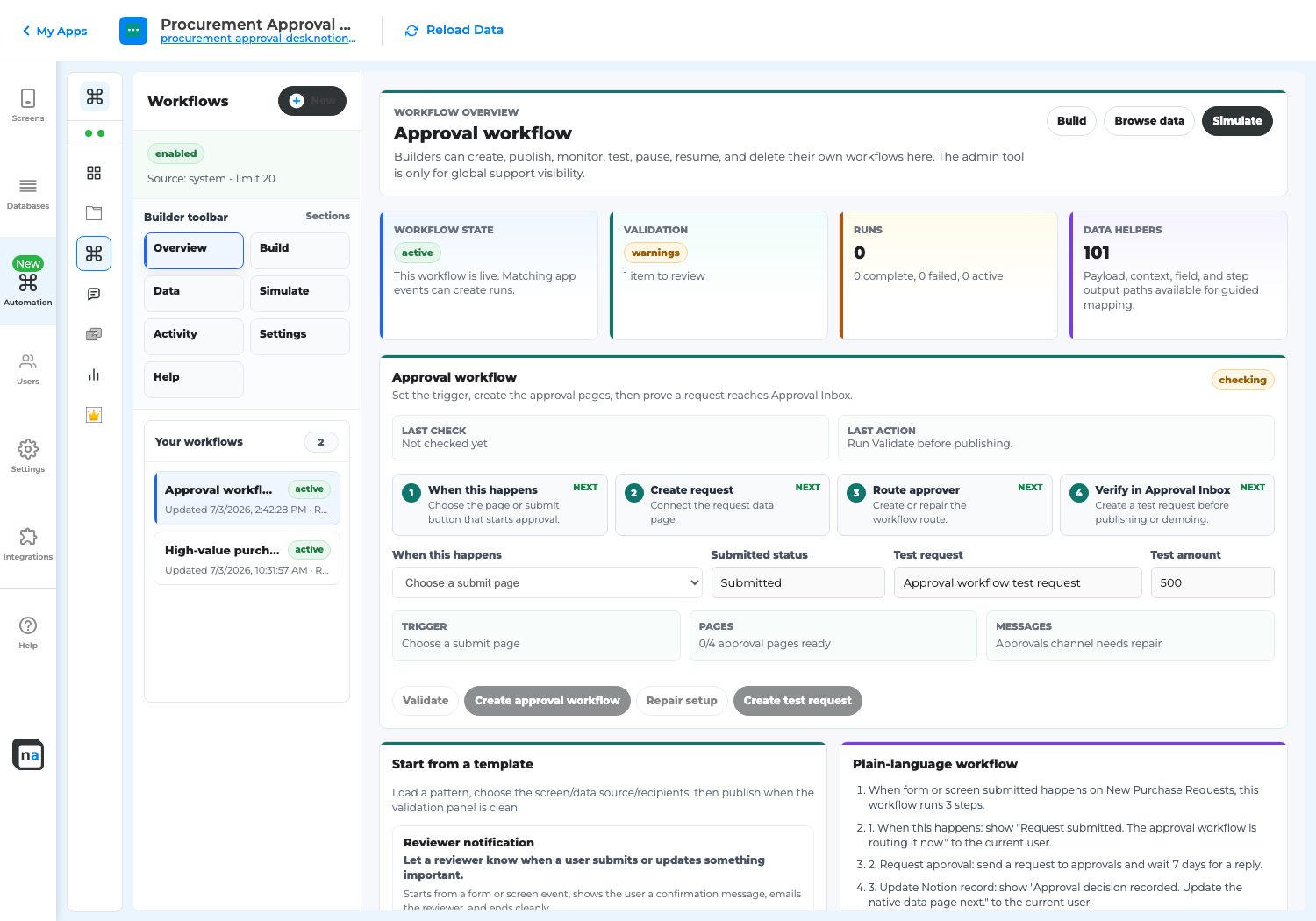
The trigger must point to the real user action, not only a status value the maker changes manually.
The short answer
Section titled “The short answer”The submit button probably saves the record but is not connected to the workflow trigger, or the button writes a status value that the workflow is not listening for.
Fix it step by step
Section titled “Fix it step by step”- Open Automation.
- Select the workflow.
- Find When this happens.
- Select the actual submit button or form submission the user clicks.
- Check the status the button writes.
- Match the workflow submitted status to that exact value.
- Save.
- Run validation.
- Create a new test request from the user-facing screen.
- Confirm the destination screen receives the item.
Do not use this as proof
Section titled “Do not use this as proof”Manual database changes are not proof that Submit works. A manual status change can start a workflow even when the user-facing button is broken. The test must use the same button the user will click.
Signs the fix worked
Section titled “Signs the fix worked”- The requester sees Submitted or Waiting for review.
- The reviewer sees the item on Decision or Work Queue.
- The message or notification is delivered.
- Workflow Status changes.
- Exception Resolution has no unexpected failure.