Native Automation And Operational Screen Guides
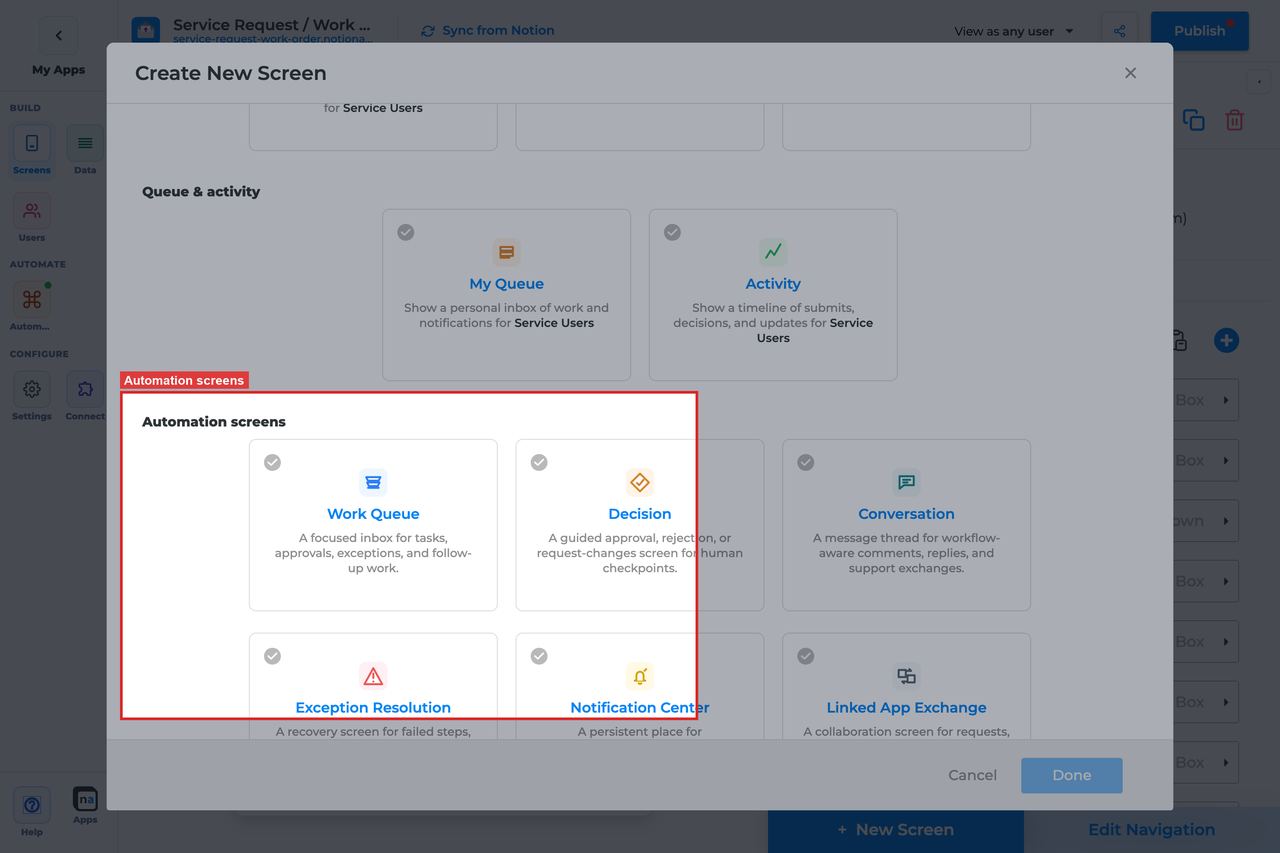
Current state: native Automation and Operational screens are entitlement-gated surfaces inside Automation. They use the same broad app-screen model as data screens, but they read NotionApps runtime state instead of ordinary Notion database rows.
NotionApps native automation screens expose workflow, messaging, queue, decision, notification, exchange, and operational state inside a live app. A normal data screen reads Notion records. A native automation screen reads platform-owned runtime activity.
Each screen guide below includes a complete builder options reference. The sections follow the builder order, and every option is explained in prose so makers can quickly understand what the control does, how to set it up, and which default or mistake matters most.
Screen Guide Index
Section titled “Screen Guide Index”| Screen | Builder group | Primary job | Primary foundation |
|---|---|---|---|
| Work Queue | Automation | A focused inbox for tasks, approvals, exceptions, and follow-up work that needs a person to claim and finish | Workflow, optional Messaging |
| Decision | Automation | A guided approval, rejection, or request-changes checkpoint where automation pauses until a person records a structured outcome | Workflow |
| Conversation | Automation | A workflow-aware message thread for comments, replies, and support exchanges tied to a record, route, or conversation | Messaging, optional Workflow |
| Exception Resolution | Automation | A recovery screen for failed steps, missing data, blocked routes, retries, and manual fixes | Workflow, optional Messaging |
| Notification Center | Automation | A persistent place for announcements, alerts, unread notices, and acknowledgements | Messaging, optional Workflow |
| Linked App Exchange | Automation | A collaboration screen for requests, messages, payloads, and acknowledgements exchanged between linked NotionApps applications | Messaging, optional Workflow |
| Workflow Status | Operational | A live timeline of workflow runs, steps, waits, retries, and outcomes so requesters and operators can see where work stands | Workflow |
| Automation Launcher | Operational | A controlled launchpad for manual workflow starts, service requests, and operator announcements | Workflow |
| Operator Console | Operational | A high-level operational dashboard for runs, queue depth, failures, messages, and audit activity | Workflow and Messaging |
Shared Builder Sections (all nine screens)
Section titled “Shared Builder Sections (all nine screens)”| Section | What the maker controls |
|---|---|
| Header and screen type | Native type, category, title, description |
| Automation source | Listen scope + workflow/form/channel/topic/linked app bindings |
| App audience and notification prefs | Tenant mode, tenant/role fields, notification categories (app-level) |
| Template setup state | Provisioned / Needs review / No setup report |
| Related context | Read-only discovery counts |
| Visibility and access | Visibility rules, allowed roles, allowed users |
| Display and action policy | Title, description, payload visibility, density, timeline, claim |
| Available actions | Action buttons, after-action screen, target workflow |
| Preview scenario | Device, persona, state, simulated vs live test |
| Empty state and sample data | Empty copy and sample runtime references |
Screen-specific sections
Section titled “Screen-specific sections”| Section | Screens |
|---|---|
| Include sheets | Work Queue, Decision |
| Submission review (Overview / Submission / Documents) | Work Queue, Decision |
| Decision outcomes + Notion status writeback | Decision |
| Inbox modes Active / History / All | Work Queue, Decision |
Choosing The Right Screen
Section titled “Choosing The Right Screen”| User job | Best screen |
|---|---|
| Claim and complete work | Work Queue |
| Approve / reject / request changes | Decision |
| Discuss a request | Conversation |
| Recover failed automation | Exception Resolution |
| Read durable notices | Notification Center |
| Inspect app-to-app handoffs | Linked App Exchange |
| Track a run’s progress | Workflow Status |
| Manually start automation | Automation Launcher |
| Monitor overall health | Operator Console |
Safe Defaults
Section titled “Safe Defaults”- Prefer Specific workflow over Entire app for user-facing desks.
- Prefer Redacted preview or Metadata only unless the audience is trusted ops.
- Restrict Operator Console, Exception Resolution, and Automation Launcher to Admin/Operator roles.
- Turn Require claim before action on for shared Decision desks.
- Bind Submission review on Decision/Work Queue before governed go-live.
- Test empty, claimed-by-other, mobile, and blocked-user paths before publish.
Related screen families
Section titled “Related screen families”- Everyday Chrome Screens — Home, Search, My Queue, Activity, Profile (app shell, not runtime desks)
- Operational screens in this index: Workflow Status, Automation Launcher, Operator Console